Quick Links
Categories
- Mobile DevelopmentTech Projects
Tags
- Android StudioDartFirebaseFlutterMobile DevelopmentReservation SystemRoom AvailabilityRoom Booking
Project Title: Development of a Room Availability Mobile Application
Project Type: Academic Project – Mobile Application
Role: Mobile Developer
Tools Used: Flutter, Dart, Firebase, Android Studio, Figma
Overview
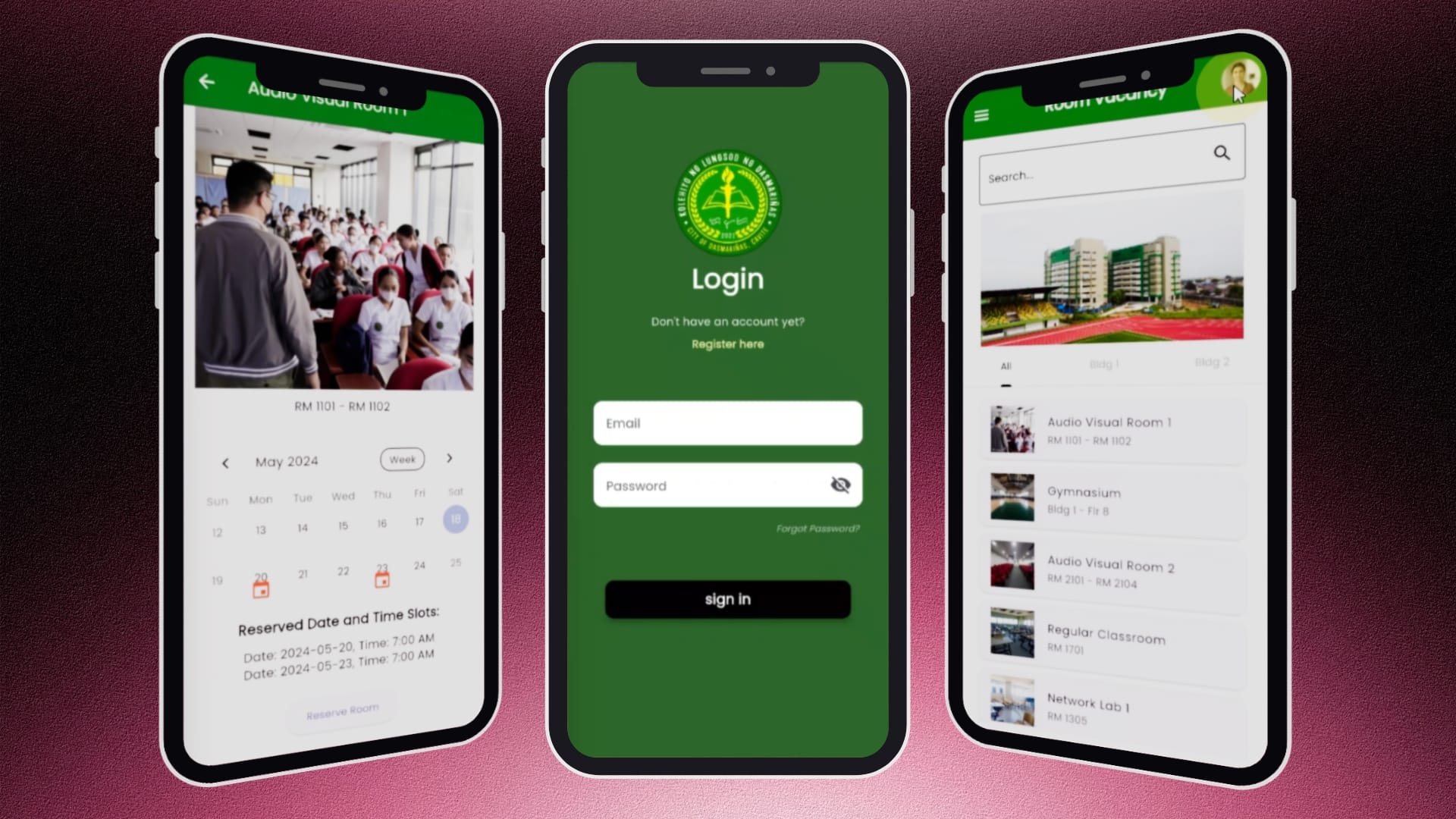
The Room Availability Mobile Application is an academic project developed to streamline classroom reservation and room availability management within the Kolehiyo ng Lungsod ng Dasmariñas (KLD). The application provides students with a centralized platform to browse available rooms, view reservation schedules, and submit booking requests, replacing the traditional manual reservation process with a more efficient digital solution.
Problem Statement
Managing classroom reservations manually often leads to scheduling conflicts, delayed approvals, and limited visibility of room availability. Students have difficulty determining whether a room is already reserved, while administrators spend significant time verifying schedules and handling booking requests.
This project addresses these challenges by providing real-time room availability information, reservation validation, and an organized booking workflow.
Objectives
- Develop a mobile application for room availability and reservation management.
- Prevent double-booking through automated reservation validation.
- Allow students to reserve rooms using their official KLD email accounts.
- Provide an intuitive and user-friendly interface for browsing rooms and managing reservations.
- Improve the overall efficiency of the reservation process.
Key Features
User Authentication
- Secure login and registration
- Validation for KLD email addresses
- Password visibility toggle
- Forgot password functionality
- Input validation and error handling
Room Browsing
- Search rooms instantly
- Categorized room listings
- Building filters
- Dynamic room information
- Hero banner and responsive interface
Room Availability
- Calendar view with Month, Week, and Two-Week filters
- Visual indicators for reserved schedules
- Dynamic display of room details and existing reservations
Reservation System
- Reservation form with date, time, number of occupants, reservation purpose
- Automatic conflict detection to prevent duplicate bookings
- Reservation submission with database integration
- Confirmation popup informing users that approval will be sent via email
User Profile Management
- Dynamic user profile
- Edit personal information with real-time database updates
- Navigation drawer with profile, Privacy Policy, Welcome message, KLD branding
User Flow
- User registers using a valid KLD email.
- User logs into the application.
- User browses available rooms or searches for a specific room.
- User selects a room to view detailed availability.
- User checks the reservation calendar.
- User completes the reservation form.
- The system validates the selected date and time.
- If no conflict exists, the reservation is saved to the database.
- The user receives confirmation that the reservation is awaiting approval via email.
Technology Stack
Frontend
- Flutter
- Dart
Backend
- Firebase Authentication
- Cloud Firestore
- Firebase Storage
Development Tools
- Android Studio
- Figma
Challenges
- Implementing real-time validation to prevent overlapping reservations.
- Synchronizing reservation data with the calendar interface.
- Designing a user-friendly navigation flow while maintaining data integrity.
- Handling authentication, form validation, and database updates efficiently.
Results
Conclusion
The completed application successfully digitized the room reservation process by providing real-time room availability, automated booking validation, and an intuitive mobile experience. The system minimized scheduling conflicts and demonstrated how mobile technology can improve campus resource management.
Developing this project strengthened my skills in Flutter mobile development, Firebase integration, authentication, database management, form validation, state management, and user interface design. It also gave me practical experience in designing a complete end-to-end application—from planning the user flow and implementing core functionalities to testing and debugging. This project enhanced my understanding of building scalable mobile applications while applying software engineering principles to solve real-world problems.