
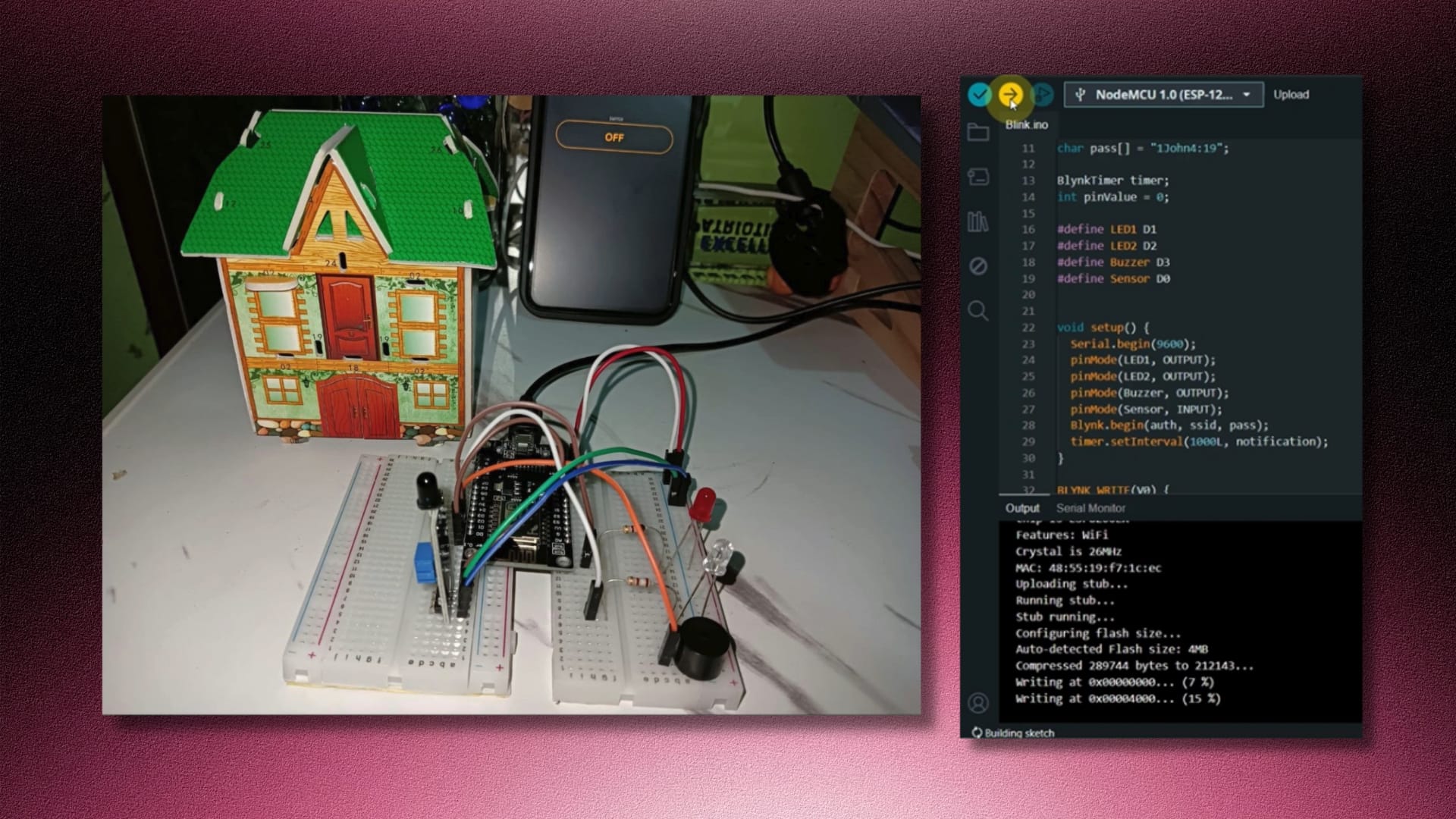
Quick Links Video Demo Features Functions Required Components Schematic Diagram Circuit Diagram User Guide Categories Internet of ThingsTech Projects Tags Arduino ProgrammingBlynkESP8266Fire Alarm SystemHardware ProjectInternet of ThingsIoTNodeMCUSensors Project Title: IoT-Based Fire Alarm System Project Type: Academic Project – Internet of Things Role: Project Manager • Developer Tools Used: NodeMCU ESP8266 microcontroller, Flame sensor, LED, Buzzer, 180-ohm Resistors, Breadboard, Jumper Wires, WIFI Library, Blynk Library Objectives To develop a reliable fire detection system using NodeMCU ESP8266; To integrate the fire alarm system with the Blynk platform for remote monitoring and control; To provide real-time notifications to users via the Blynk app in case of fire detection; and To ensure ease of installation and configuration for end-users. Features IoT Technology – The system utilizes Internet of Things technology, allowing for remote monitoring and control of the fire alarm system. Flame Sensor – Incorporates a flame sensor module to detect the presence of fire or abnormal heat levels. Push Notification – Sends push notifications to the user’s smartphone via the Blynk app in case of a fire event, ensuring immediate awareness and response. Blynk Integration – Integrates with the Blynk platform, enabling remote access to the fire alarm system from anywhere with an internet connection. Suitable for Various Settings – Designed for use in homes, offices, and factories. Functions Fire Detection – Monitors the environment for signs of fire using the flame sensor module, triggering an alarm when detected. Push Notification Alert – Sends real-time push notifications to the user’s smartphone through the Blynk app upon detecting a fire, to ensure prompt action can be taken. Remote Monitoring and Control – Allows users to remotely monitor the status of the fire alarm system and control its functions through the Blynk app. Safety Assurance – Enhances safety measures by providing timely alerts in the event of a fire, helping to minimize potential damages and ensure the safety of occupants in the connected location. Easy Installation and Operation – Offers a user-friendly interface and straightforward setup process, making it accessible to users with varying levels of technical expertise. Required Components NodeMCU board (ESP8266) Flame sensor LED 180-ohm resistors Buzzer Breadboard Jumper wires WIFI library Blynk library Schematic Diagram Circuit Diagram Video Demonstration https://youtu.be/Q0gIdRI_51c User Guide Introduction: The IoT Based Fire Alarm System is a smart monitoring solution designed to detect fire incidents and provide timely alerts to users via the Blynk mobile application. This guide outlines the operation and functionality of the system. System Components: NodeMCU ESP8266 microcontroller Flame sensor module White LED (LED1) Red LED (LED2) Buzzer Blynk mobile application System Operation:Power On: Upon powering on, the NodeMCU board initializes and connects to the Blynk cloud server through the internet. System Activation: Users can toggle the system ON or OFF using the Blynk app. Monitoring Mode: When the system is activated, it continuously monitors the environment using the flame sensor module for signs of fire or abnormal heat levels. Fire Detection: If a fire event is detected, the system triggers an alarm by activating the red LED and sounding the buzzer simultaneously. Push Notification: A push notification is sent to the user’s smartphone via the Blynk app, alerting them to the fire incident. User Response: Upon receiving the push notification, users can take appropriate action, such as contacting emergency services or evacuating the premises. Return to Normal Operation: After the fire alarm is triggered and the notification is sent, the system returns to its normal state. Status Indication: The white LED bulb is activated to indicate that the system is no longer in an alarm state and is ready for monitoring again. Continuous Monitoring: The system remains operational, continuously monitoring for fire events and providing alerts when necessary. Using the Blynk App: Users can control the system’s ON/OFF status and monitor its operation through the intuitive interface of the Blynk mobile application. The Blynk app allows users to receive push notifications, view logs, and monitor the status of the fire alarm system in real-time. Safety Precautions: Ensure proper installation and placement of the fire alarm system components according to safety standards. Regularly test the functionality of the system to ensure it operates effectively in case of emergencies. In the event of a fire alarm activation, follow established safety protocols and evacuation procedures. The Fire Alarm System provides an essential layer of safety and security by detecting fire incidents and promptly alerting users for timely response and action. By leveraging the Blynk platform, users can monitor their premises remotely and ensure the safety of their property and occupants.
Professors’ Evaluation Mobile App
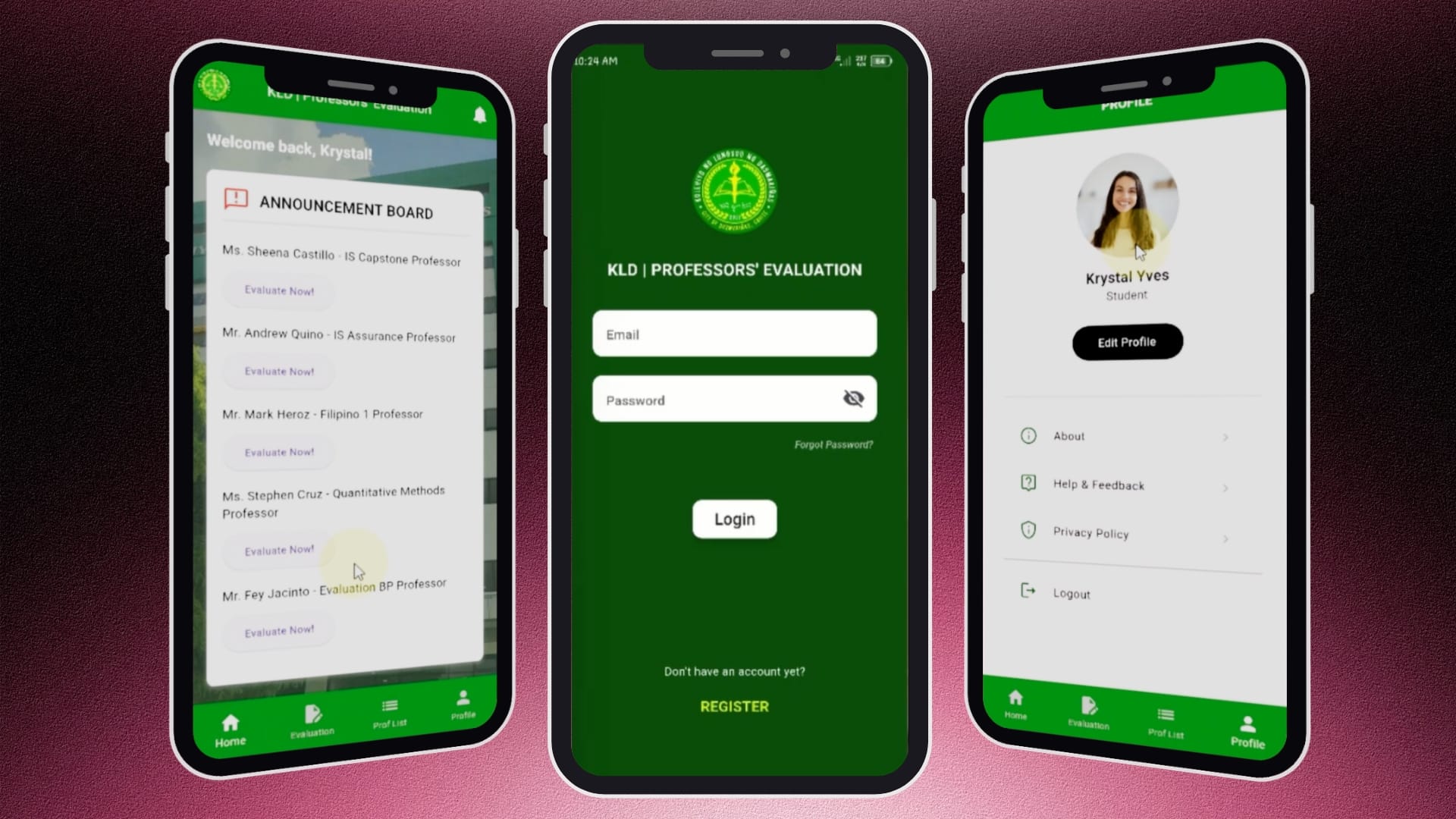
Quick Links Video Demo Problem Statement Objectives Key Features User Flow Technology Stack Categories Mobile DevelopmentTech Projects Tags Android StudioDartFaculty EvaluationFirebaseFlutterMobile DevelopmentSurvey System Project Title: Development of a Professors’ Evaluation Mobile Application Project Type: Academic Project – Mobile Application Role: Mobile App Developer Tools Used: Flutter, Dart, Firebase, Android Studio, Figma Overview The Professors’ Evaluation Mobile Application is an academic project designed to digitize the faculty evaluation process for higher education institutions. The application enables students to securely evaluate professors through a mobile platform while providing an organized workflow for managing pending and completed evaluations. By replacing traditional paper-based evaluation forms, the system improves accessibility, data accuracy, and efficiency. Problem Statement Traditional professor evaluations are often conducted using paper forms or fragmented digital processes, making them time-consuming to distribute, collect, and organize. These methods may result in delayed submissions, incomplete records, and increased administrative workload. Students also have limited visibility into pending evaluations, which can lead to missed submissions. This project addresses these challenges by providing a centralized mobile application where students can conveniently complete evaluations, monitor their progress, and securely manage their accounts. Objectives Develop a mobile application for professor evaluations. Simplify the evaluation process through an intuitive user interface. Allow students to track pending and completed evaluation tasks. Securely collect and store evaluation data in a centralized database. Improve efficiency and accuracy in managing faculty evaluations. Key Features User Authentication – Secure user registration and login – Email and password validation – Password visibility toggle – Forgot password functionality – Comprehensive input validation and error handling Dashboard – Personalized welcome message – Announcement board displaying pending evaluation tasks – Quick access to evaluation forms – Bottom navigation for seamless page transitions Evaluation Management – Separate tabs for pending and completed evaluations – Dynamic list of professors assigned for evaluation – Timestamp tracking for completed submissions – Direct navigation to evaluation forms Evaluation Form – Dynamic display of professor and subject information – Rating and remarks input fields – Secure submission and database storage of evaluation results Professor Directory – Organized list of professors – Display of professor details – Easy navigation from the evaluation workflow User Profile – Dynamic profile information and profile image – Edit profile functionality – About, Help & Feedback, and Privacy Policy pages – Secure logout feature Profile Management – Real-time editing of contact information – Protected email field to maintain account integrity – Password verification before saving profile updates User Flow User registers an account and logs in securely. The dashboard displays pending evaluation tasks. The user selects a professor to evaluate. The evaluation form displays the professor’s information. The user submits evaluation scores and remarks. The evaluation is stored in the database and marked as completed. Users can review completed evaluations and manage their profile information. Technology Stack Frontend Flutter Dart Backend Firebase Authentication Cloud Firestore Firebase Storage Development Tools Android Studio Figma Challenges Designing a smooth evaluation workflow while preventing duplicate submissions. Implementing dynamic task management for pending and completed evaluations. Managing user authentication, validation, and profile updates securely. Building an intuitive mobile interface that simplifies the evaluation process while maintaining data integrity. Results https://vimeo.com/1203675521?share=copy&fl=sv&fe=ci The application successfully digitized the professor evaluation process by providing students with an organized, accessible, and user-friendly platform for completing evaluations. It streamlined evaluation management, improved data consistency, and demonstrated how mobile applications can modernize academic administrative processes. Conclusion Developing this project strengthened my skills in Flutter development, Firebase Authentication, Cloud Firestore, mobile UI/UX design, form validation, state management, and database integration. It also provided valuable hands-on experience in building a complete mobile application, implementing secure authentication, managing dynamic data, and creating user-centered workflows that solve real-world academic challenges.