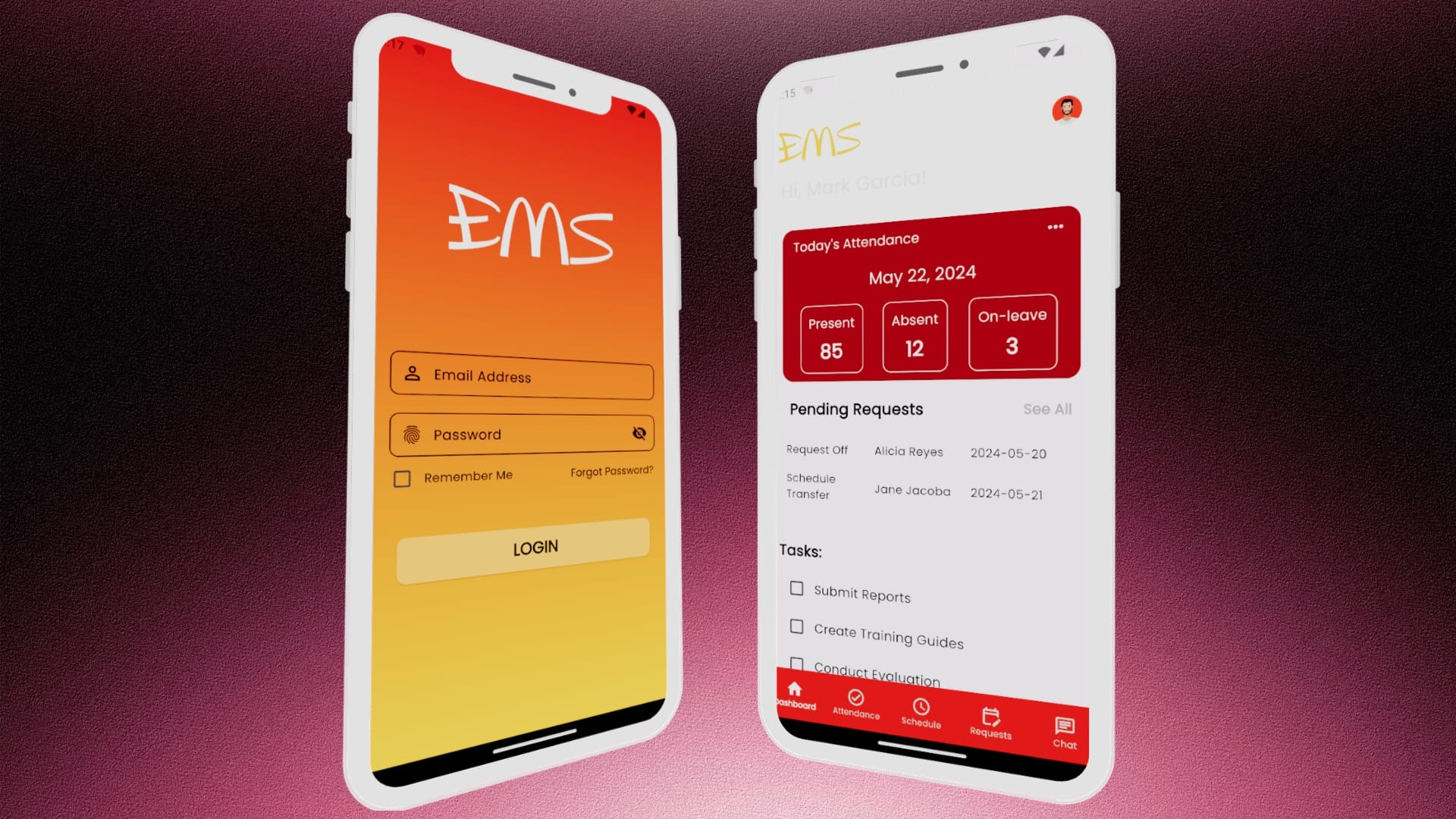
Quick Links Video Demo Problem Statement Project Objectives Key Features Research Approach Technology Stack Categories Mobile DevelopmentTech Projects Tags Android StudioCloud DatabaseDartEmployee ManagementFirebaseFlutterMobile AppMobile Development Project Title: Employee Management System (EMS) Project Type: Capstone Project – Mobile Application Role: Project Manager • Business & System Analyst • UI/UX Designer • System Developer Tools Used: Flutter, Dart, Firebase, Android Studio, Figma Executive Summary The Employee Management System (EMS) is a capstone project developed to address common workforce management challenges experienced by organizations that rely on shift-based operations. The application was designed as a mobile solution that centralizes employee information, automates scheduling, streamlines attendance monitoring, digitizes leave management, and improves communication between management and employees. Developed using Flutter and Firebase, the system provides a secure and scalable platform that enables organizations to manage daily workforce operations efficiently while reducing dependence on manual processes. By integrating multiple human resource functions into a single mobile application, the project demonstrates how modern mobile technologies can improve operational efficiency, data accessibility, and employee engagement. Background Many organizations still rely on spreadsheets, paper-based records, messaging platforms, and disconnected systems to manage employee-related processes. While these methods may be sufficient for smaller teams, they often become inefficient as organizations grow, leading to challenges such as time-consuming schedule creation, attendance tracking errors, delayed leave approvals, scattered employee information, poor communication, difficulty generating reports, and increased administrative workload. These issues emphasize the need for a centralized mobile solution that streamlines workforce management, improves operational efficiency, and provides secure, real-time access to employee data. Problem Statement The study identified several operational problems commonly encountered in employee management: Manual scheduling consumes significant administrative time. Employee attendance is difficult to monitor accurately. Leave requests require multiple communication channels. Employee records are stored across different files and platforms. Internal announcements are often missed due to decentralized communication. Performance evaluation records are difficult to organize and retrieve. Employees have limited access to important employment information such as schedules and payslips. These issues reduce operational efficiency and increase the possibility of human error. Project Objectives The primary objective of the project was to design and develop a mobile-based Employee Management System capable of streamlining workforce management processes through automation and centralized information management. Specifically, the system aims to: Centralize employee information into a single database. Automate employee scheduling and attendance monitoring. Digitize leave request and approval processes. Provide secure access to employee payslips. Facilitate employee performance evaluations. Improve internal communication between employees and management. Implement role-based authentication for secure system access. Enhance productivity by minimizing manual administrative tasks. Proposed Solution The Employee Management System is a mobile application that integrates multiple human resource functions into a unified platform. The application provides different levels of access based on user roles, ensuring that employees, supervisors, and administrators can perform only the functions relevant to their responsibilities. The system replaces fragmented manual workflows with a centralized digital platform, enabling real-time access to workforce information and improving collaboration across the organization. Key Features Employee Information Management Maintains a centralized repository of employee records, including personal information, department assignments, employment status, and contact details. Schedule Management Allows managers to create, assign, and modify work schedules while enabling employees to view assigned shifts through the mobile application. Attendance Monitoring Digitally records employee attendance and provides managers with real-time attendance reports. Leave Management Employees can submit leave requests electronically, while managers can review, approve, or reject requests within the application. Digital Payslip Access Provides employees with secure access to electronic copies of their payslips for viewing and downloading. Performance Evaluation Supports digital employee performance assessments using standardized evaluation forms. Employee Onboarding Provides newly hired employees with training materials and onboarding resources accessible through the mobile application. Internal Communication Includes an integrated messaging feature that enables announcements and communication between employees and management. Reports and Analytics Generates operational reports that support workforce monitoring and management decision-making. Video Demo https://youtu.be/pqK7HlkrgBo Research Approach This project adopts a developmental research approach using the Software Development Life Cycle (SDLC) framework to systematically design, develop, test, and implement the Employee Management System. The SDLC provides a structured process consisting of the following phases: Ideation – Identifying workforce management challenges and defining the project’s objectives. Requirements Gathering – Collecting and analyzing functional and non-functional requirements through stakeholder consultation. Design – Developing the system architecture, database structure, and user interface prototypes. Development – Building the mobile application and integrating the required functionalities. Testing – Conducting functional and usability testing to identify defects and ensure system reliability. Deployment – Preparing and implementing the system for operational use. Maintenance – Providing continuous updates, improvements, and technical support to ensure long-term system performance. To complement the structured phases of the SDLC, the project integrates the Agile methodology to promote flexibility, iterative development, and continuous stakeholder collaboration. Development is carried out through four iterative milestones: Define – Establishing project scope, objectives, and system requirements. Design – Creating user-centered interface designs and system architecture. Develop – Implementing system features through incremental coding and continuous testing. Demo – Presenting each iteration to stakeholders for evaluation, feedback, and refinement. The integration of Agile within the SDLC enables continuous improvement throughout the development process, ensuring that the system remains aligned with user requirements, organizational objectives, and quality standards while allowing timely adaptation to changing needs. Technology Stack Frontend Flutter Framework Dart Programming Language Backend Firebase Authentication Cloud Firestore Firebase Storage Development Tools Android Studio Figma User Roles Administrator Responsible for overall system administration, employee management, report generation, and user access management. Manager Responsible for scheduling, attendance monitoring, employee evaluations, and request approvals. Employee Can access schedules, attendance records, payslips, leave requests, onboarding materials, and communication tools. Expected Outcomes The Employee Management System is expected to provide the following benefits: Reduced administrative workload Faster schedule preparation Improved attendance monitoring Centralized employee information Digital document management Improved communication Enhanced employee accessibility Increased operational efficiency Reduced paperwork Improved workforce transparency Conclusion The development of the Employee Management System (EMS) successfully demonstrated the application of software engineering principles in creating

E-Commerce Website and Management System
Quick Links Video Demo Objectives Technology Stack Website Features Categories Tech ProjectsWeb DevelopmentWebsite Tags Business WebsiteCMS DevelopmentE-commerceElementorInventory ManagementPoint of SalePOS SystemRetail SolutionVitePOSWooCommerceWordPress Project Title: E-Commerce Website & Management System Project Type: Client Project – Web Application Role: Project Manager • Business & System Analyst • UI/UX Designer • Web Designer • Database Administrator Tools Used: WordPress, Elementor, WooCommerce, VitePOS Project Overview Background A growing hardware store required a modern e-commerce platform that would allow customers to conveniently browse, purchase, and inquire about hardware products online while enabling the business to efficiently manage inventory, in-store sales, employee attendance, orders, and business analytics from a centralized system. The objective was to replace the traditional manual sales process with a digital solution capable of supporting both online and physical store operations without requiring separate systems. The solution was developed using WordPress, WooCommerce, VitePOS, and several integrated business management plugins, creating a unified ecosystem for sales, inventory, customer management, reporting, and day-to-day operations. Project Objectives The project was designed to achieve the following goals: Establish a professional online presence Enable customers to order products online Simplify inventory management Synchronize online and in-store sales Improve customer service and accessibility Generate real-time sales reports and analytics Digitize employee attendance monitoring Reduce manual administrative work Create a scalable platform for future business growth Technology Stack Core Platform WordPress CMS WooCommerce Business Management VitePOS (Point of Sale) WooCommerce Mobile App Employee Attendance Plugin Analytics & Reporting Plugins Business Email Integration Supporting Features Facebook Messenger Chat Integration Google Maps Integration Product Search & Filtering Secure Checkout Customer Account Management Responsive Design SEO-ready Architecture Video Demonstration https://youtu.be/m5vrxCI5ZxU E-Commerce Store Web Development (Website Navigation) https://youtu.be/MllSIblz8ls E-Commerce Store Web Development (Admin Access Part 1) https://youtu.be/SgrgXHb2JfM E-Commerce Store Web Development (Admin Access Part 2) Website Features Delivery Notice A notification bar is displayed at the top of the page informing customers that delivery services are available only within the designated service areas. This immediately sets customer expectations before shopping. Contact Information Bar The second navigation bar contains: Store address linked directly to Google Maps Contact number Email link Social media links “How to Order” button leading to a step-by-step ordering guide This provides multiple communication channels and improves customer accessibility. Primary Navigation The main navigation includes: Product search bar Business logo Customer profile Shopping cart Customers can quickly search thousands of products while accessing their accounts and shopping cart from anywhere on the website. Product Categories A dedicated navigation menu displays all major hardware categories, allowing users to locate products quickly. Messenger Chat Integration A floating Facebook Messenger chatbot appears at the bottom-right corner of every page. Customers can immediately contact the business for: Product inquiries Availability Quotations Delivery questions Order assistance without leaving the website. Featured Brands Below the hero section, customers can browse the trusted brands carried by the hardware store. This improves customer confidence and brand recognition. Category Cards Visual category cards make browsing significantly easier. Selecting a category redirects users to a dedicated product listing page. Category Product Page Each category page provides an organized shopping interface. Left Sidebar Product Search Price Filter Current Shopping Cart Summary Main Content Displays: Product Images Product Names Prices Add to Cart button Shopping Cart Experience When customers click Add to Cart, the button instantly changes to View Cart, allowing users to proceed directly to checkout. The shopping cart displays: Product information Quantity adjustment Price breakdown Cart totals Checkout button Homepage Highlights Additional homepage sections include: Featured Products Customer Reviews Business Hours Contact Section These sections increase customer trust while encouraging purchasing decisions. Footer The footer serves as the website’s information hub containing: Company logo Business overview Help Center Frequently Asked Questions How to Order guide Privacy Policy Returns & Refund Policy Terms & Conditions Contact Information Customer Ordering Workflow Administrative System The website includes a powerful administrative dashboard for business management. Upon login, administrators are presented with a centralized dashboard featuring quick access cards for: Point of Sale Orders Products Reports Attendance Analytics This dashboard serves as the command center for daily operations. Point of Sale (VitePOS) The integrated Point of Sale system allows physical store transactions to be processed using the same product database as the online store. Upon opening POS, staff are prompted to verify or update the cash drawer balance before beginning transactions. The POS interface includes: Product categories Product search Customer management Discount application Additional fees Order notes Built-in calculator Multiple payment methods Receipt generation Receipt printing Checkout Process Cashiers can: Search products Scan items Add customers Apply discounts Add transaction notes Select payment method Calculate customer change automatically Complete transactions Print receipts This minimizes checkout time while improving transaction accuracy. Inventory Management WooCommerce acts as the central inventory system. Inventory is automatically updated after: Online purchases In-store POS sales Product returns Manual stock adjustments This eliminates duplicate inventory records and significantly reduces stock discrepancies. Administrators can easily manage: Product information Categories Pricing Stock quantities Product images Product descriptions Product visibility Order Management Every online order is stored within WooCommerce. Administrators can: View customer information Monitor order status Process new orders Update fulfillment status Complete deliveries View order history This creates a complete order lifecycle management system. Mobile Order Management Using the WooCommerce Mobile App, administrators can manage the business remotely. Capabilities include: View new orders Update order statuses Receive order notifications Manage products Review sales Business owners remain connected even while away from the store. Employee Attendance The integrated attendance plugin digitizes workforce management. Management can update and review daily attendance, attendance history, and employee records. Business Analytics The analytics dashboard provides valuable insights into business performance. Reports include: Sales Performance Inventory Reports Order Statistics Store Performance Metrics These reports support informed business decisions through real-time data. Business Email Integration Professional business email account were integrated throughout the platform. This enables: Customer communication Order confirmations Administrative notifications Business correspondence while reinforcing the store’s professional brand image. Security & Performance The platform was configured with best practices for reliability and performance, including: Secure administrator authentication SSL encryption
College Department Website
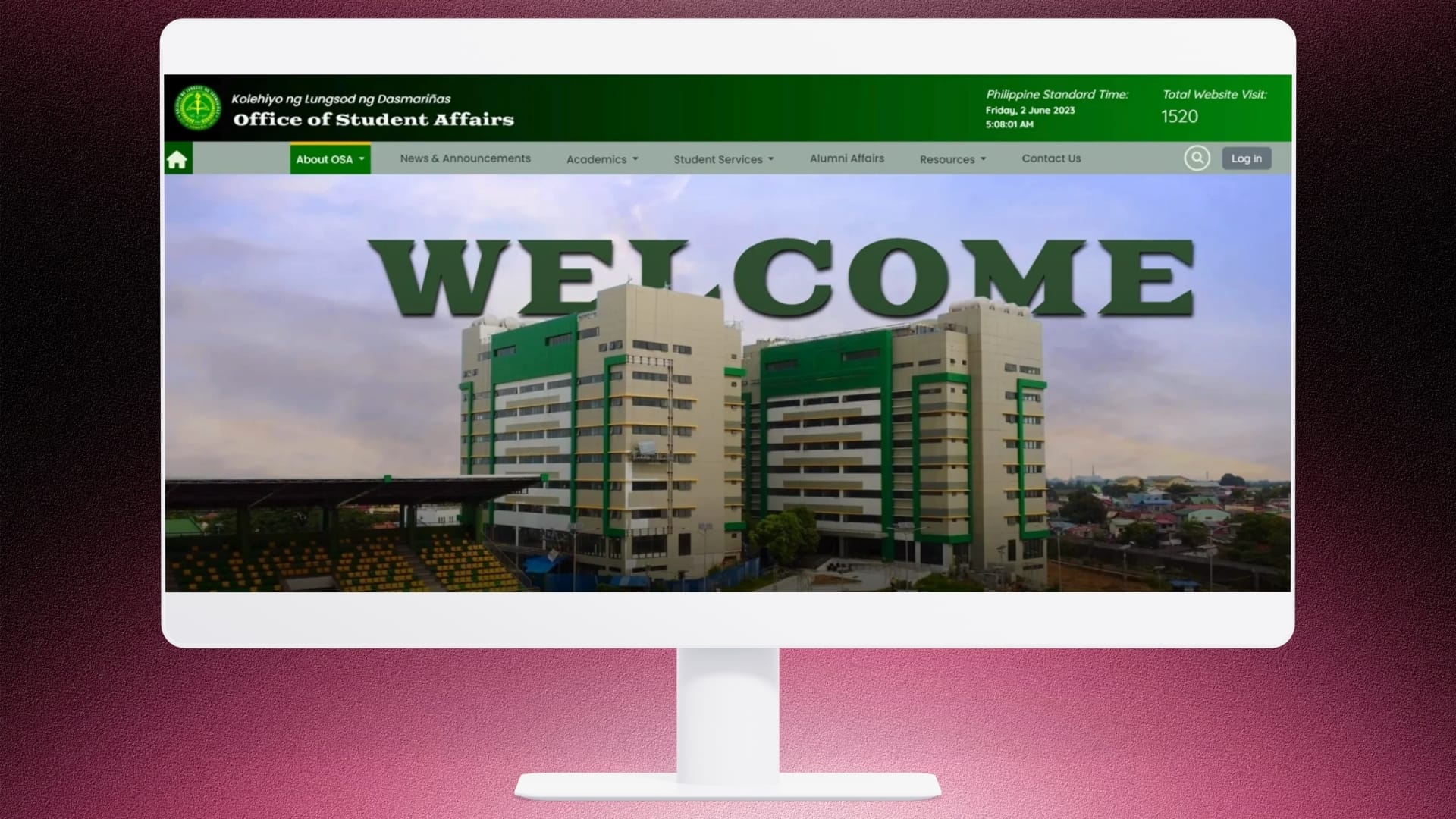
Quick Links Video Demo Objectives Website Features Results Categories Tech ProjectsWeb DevelopmentWebsite Tags CSSDatabase DesignDepartment WebsiteFull-Stack DevelopmentHTMLJavaScriptMySQLPHPWebsite Development Project Title: Development of a College Department Website Project Type: Academic Project – Web Application Role: Project Manager • Web Developer Tools Used: HTML, CSS, JavaScript, PHP, MySQL Overview The Office of Student Affairs (OSA) Website was developed as a centralized digital platform for Kolehiyo ng Lungsod ng Dasmariñas to improve communication between the OSA and the student community. The website serves as a comprehensive information hub where students can easily access essential information about student services, campus activities, organizations, and academic support resources. Objectives The project aimed to: Establish an official online presence for the Office of Student Affairs. Centralize information related to student services and support. Improve accessibility to academic advising and campus resources. Promote student organizations and extracurricular activities. Provide timely announcements and updates to the student body. Website Features The Office of Student Affairs (OSA) Website was designed to serve as a centralized digital information portal for students, faculty, alumni, and prospective applicants. The platform features an interface with organized navigation, enabling users to quickly access essential information and student support services. Parallax Hero Section A visually engaging hero section with a parallax scrolling effect introduces visitors to the Office of Student Affairs, creating a modern and interactive first impression while highlighting the department’s mission of supporting student development and success. About OSA A dedicated section providing comprehensive information about the Office of Student Affairs, including: Mission and Vision Office Mandate Services Offered Board of Regents Organizational Chart This section helps students understand the department’s objectives, leadership, and organizational structure. News & Announcements A centralized page for publishing the latest campus news, official announcements, upcoming activities, and important advisories to keep students informed about current events and institutional updates. Academic Programs A section showcasing the academic programs supported by the institution, providing students with quick access to program-related information, including: Information Systems Program Psychology Program Midwifery Program Nursing Program Civil Engineering Program Website Search An integrated search functionality enables users to quickly locate pages, announcements, academic programs, services, and resources, significantly improving navigation and overall user experience. Student Services A comprehensive directory of student support services offered by the Office of Student Affairs, including: Testing and Admission Counseling and Guidance Student Organizations and Student Council Student Discipline Lost and Found Services Scholarship Grants Publication Unit This section enables students to easily locate the appropriate office or service for their specific needs. Alumni Affairs A dedicated portal containing information, announcements, and initiatives for alumni, helping maintain engagement between graduates and the institution while supporting alumni-related programs and activities. Resources A centralized repository of important student references and downloadable materials, including: Student Handbook Downloadable Forms Photo Gallery Document Archives This section provides convenient access to essential documents and institutional resources. Contact Us A contact page containing the Office of Student Affairs’ contact information, office location, inquiry form, and communication channels, allowing students and stakeholders to easily reach the department for assistance. Solution The website was designed with an intuitive navigation structure, allowing students to quickly locate relevant information. A visually engaging parallax hero section creates a modern first impression while highlighting the institution’s commitment to student development. Content is organized into dedicated sections, making important resources and announcements easy to access. Video Demonstration https://youtu.be/p80FbjtxAdY Results The implementation of the Office of Student Affairs Website provided Kolehiyo ng Lungsod ng Dasmariñas with a centralized and user-friendly platform for disseminating information and supporting student engagement. By digitizing access to services, campus activities, academic advising, and student organization information, the website significantly improved communication between the Office of Student Affairs and the student community while strengthening the institution’s digital presence.
Development of Brand Identity for a Student Organization – GitCub
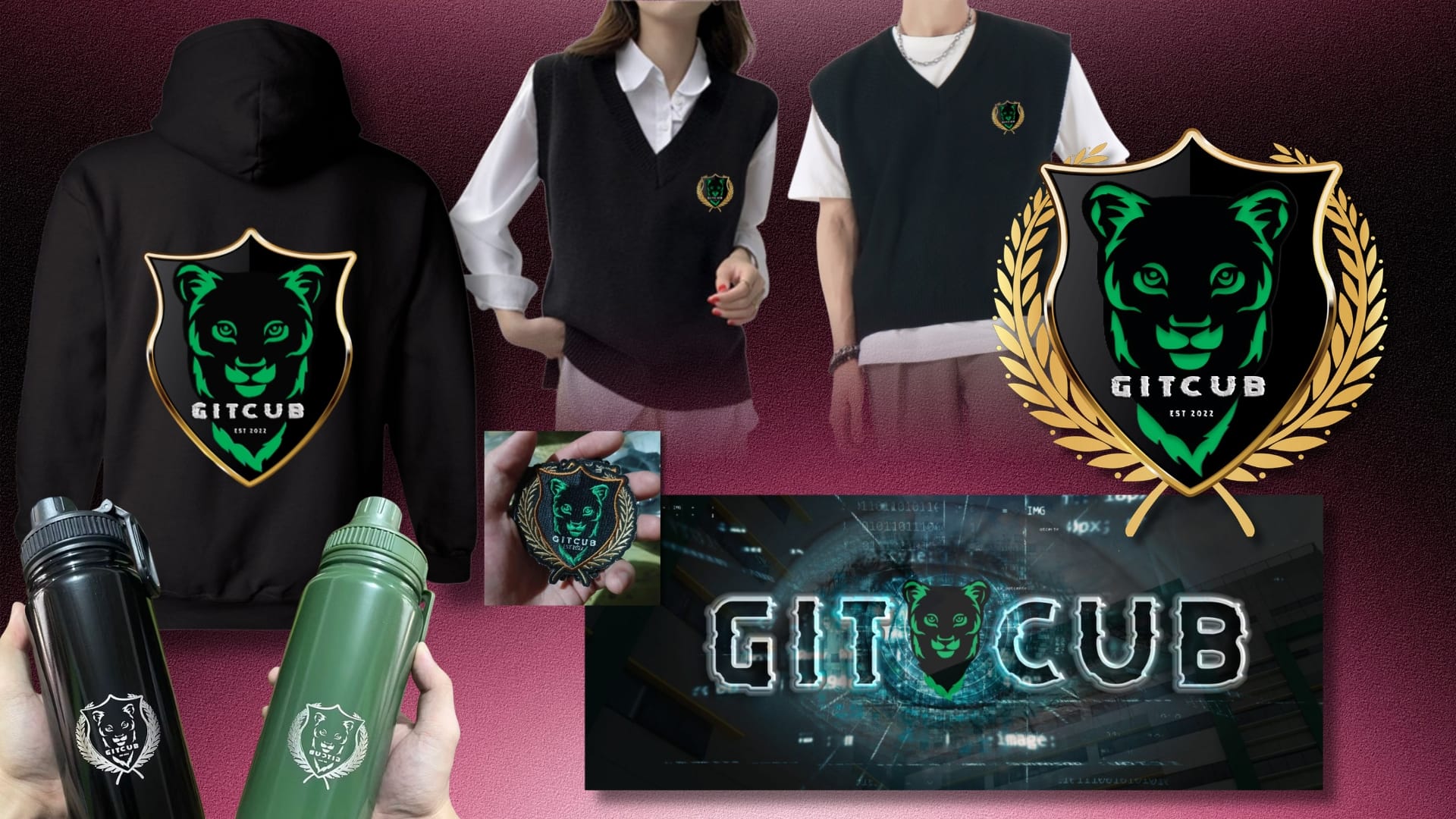
Quick Links Concept Exploration Symbolism of the Cub The Strategy The Solution Final Deliverables Long-Term Impact Categories Brand & IdentityCreative Design Tags Apparel DesignBrand IdentityBrand StrategyGraphic DesignLogo DesignMerchandise DesignStudent OrganizationVisual Identity Overview Project Title:Development of Brand Identity for a Student Organization – GitCub Project Type:Organization Project Role:Designer · Brand Strategist · Organization Secretary Responsibilities:Led the conceptualization, strategy development, visual identity creation, and implementation of the organization’s branding system in collaboration with organization officers and institutional stakeholders. Tools Used:Canva • Adobe Photoshop The Problem GitCub was a newly established student organization under the Institute of Computing and Digital Innovation (ICDI) of Kolehiyo ng Lungsod ng Dasmariñas. Founded during the institution’s pioneering years, the organization needed a complete visual identity from the ground up. The challenge was not simply to create a logo, but to establish a cohesive and recognizable brand identity that could represent the organization’s mission, values, and culture across both digital and physical platforms. At the time, the university itself was still undergoing rapid organizational and branding developments. Since the institution only started operating in 2021, several departments were continuously implementing adjustments, including changes to official branding guidelines and color systems. This created a moving target for the organization’s identity development. The most significant challenge centered around the logo design process. Months after the establishment of the organization’s logo and branding materials — particularly after the identity direction had already been approved and implemented — the university revised its official institutional color palette to align with the City of Dasmariñas branding system. As a result, the organization’s logo color palette had to be revised to comply with the updated institutional branding requirements, including the redesign and adjustment of previously developed branding materials that already incorporated the original logo system. This required a strategic redesign that preserved the organization’s established identity while adapting to newly mandated institutional branding requirements. The project therefore needed to solve several key problems: Create a distinctive identity for a newly formed organization with no existing visual foundation Balance professionalism with a student-centered and approachable image Ensure adaptability across uniforms, merchandise, publications, and digital platforms Differentiate the organization from visually similar campus organizations Align with evolving university branding requirements without losing brand recognition Build an identity that students would feel proud to wear and represent The Analysis Understanding the Organization GitCub was founded on October 11, 2022, by pioneering students who wanted to create a collaborative academic community focused on mentorship, growth, and peer support within the field of computing and digital innovation. The organization officially received institutional recognition on December 22, 2022. At its core, GitCub aimed to foster: Academic collaboration Leadership development Technical growth Student mentorship Community and belonging During discussions with founding officers and members, I gathered recurring themes that later became the foundation of the organization’s visual identity strategy. The recurring themes included: Strength Leadership Confidence Innovation Unity My objective was to translate these themes into an identity system that felt modern, memorable, and institutionally credible without appearing overly formal or intimidating to students. Concept Exploration Logo Shape Analysis – Why the Shield? After analyzing existing student organization identities, I strategically selected the shield shape because it communicated: Strength Leadership Protection of values Honor Identity Authority Distinction Unlike circular logos that often blend into institutional environments, the shield structure created strong silhouette recognition even before typography or color were processed. The shield became a symbolic statement: GitCub would not simply imitate existing organizations — it would establish its own identity. Symbol & Element Selection The logo system featured: A lion cub face A shield base structure Golden leaf framing Modern “Debug” typography for GitCub name Symbolic Meaning of the Elements Element Meaning Lion Cub Growth, curiosity, courage, emerging leadership Shield Protection, strength, honor, distinction Golden Leaves Achievement, growth, excellence Modern Typography Innovation, technology, contemporary identity Why the Lion Cub? One of the most important conceptual decisions I proposed during the project was the use of the lion cub as the organization’s central symbol. The “cub” in GitCub evolved beyond a simple wordplay reference and became a symbolic representation of the organization’s identity, aspirations, and growth journey. Symbolism of the Cub I developed the lion cub concept to represent: Emerging leadership Potential and growth Courage despite being young Curiosity and learning Future strength in development This symbolism closely mirrored the reality of the organization itself. GitCub was founded by pioneering students within a newly established university. Much like a cub still growing into its strength, the organization represented students who were still developing their technical skills, identities, and leadership capabilities. Rather than portraying dominance or authority through a fully mature lion, I intentionally chose the cub because it communicated something more relatable and authentic: growth in progress. This approach made the identity more approachable to students while still retaining symbolism associated with strength, bravery, confidence, and leadership. The cub also aligned with the organization’s mentorship-driven culture. It symbolized students learning together, supporting one another, and gradually growing into future professionals and leaders in technology. Color Palette Analysis The initial color palette of the GitCub identity system was developed with blue as the primary color, supported by black and dark gray for the shield structure, gray tones for the organization name in a modern “Debug”-style typography, and orange-gold accents for the leaf elements. The blue-based direction was chosen to communicate trust, loyalty, and reliability, while reinforcing a professional yet approachable identity. Combined with the shield and golden leaf elements, the overall system conveyed strength, prestige, and emerging leadership. Following institutional review and updated university branding guidelines, the primary color was revised from blue to green to align with the official school color system. This adjustment shifted the identity focus toward growth, harmony, and development while maintaining the original visual structure. The revised palette—green, black, gold, and gray—preserved the core symbolism of the design while ensuring compliance with institutional standards and maintaining brand consistency across all applications. Uniform Design Analysis During my observation of various student organizations within our university and other institutions, I
C++ Student Grades Portal
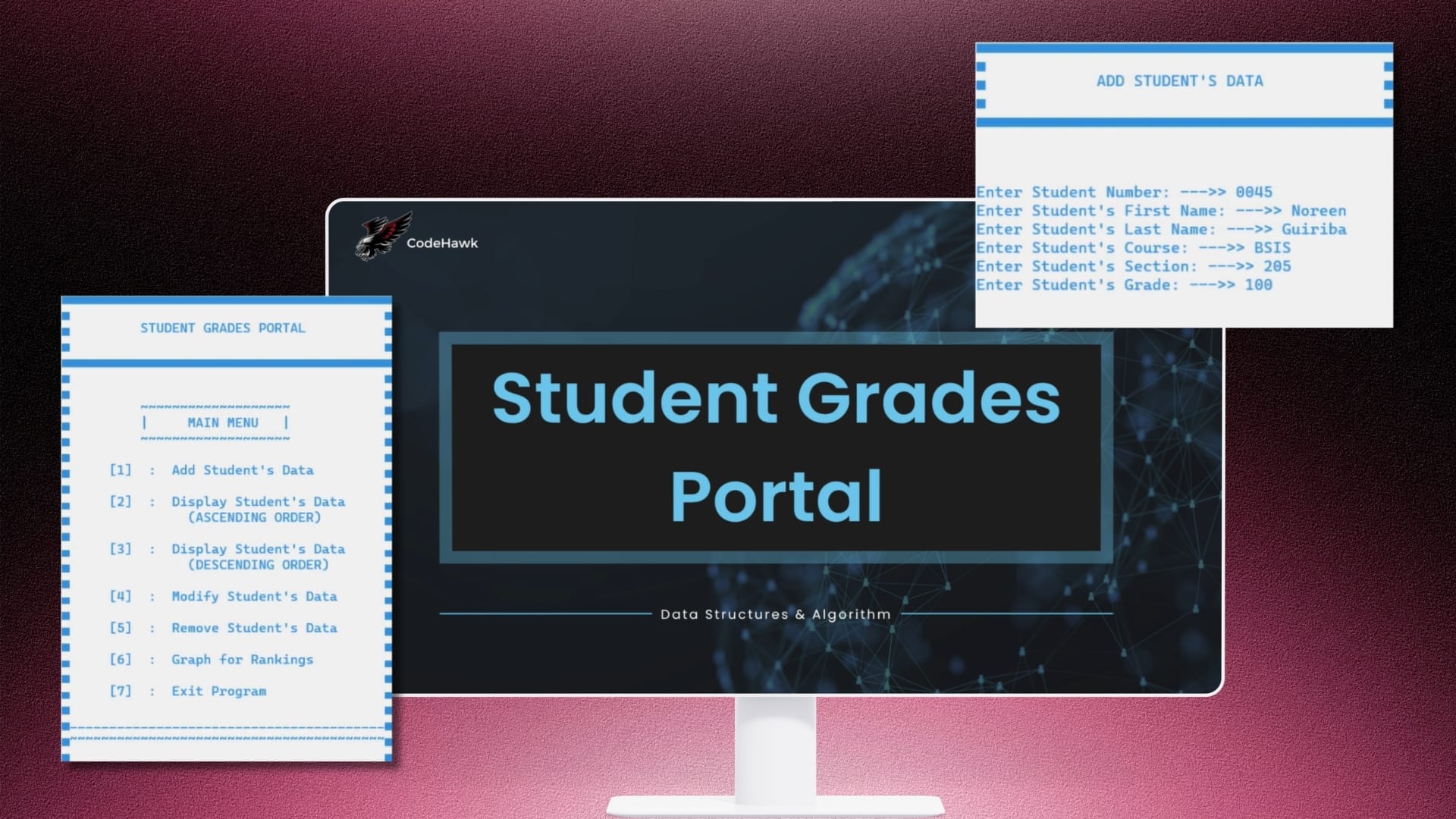
Quick Links Video Demo Objectives System Features Categories Tech ProjectsWeb Development Tags C++Console ApplicationCRUD OperationsData StructuresGrade Management SystemObject-Oriented ProgrammingStudent Grades PortalStudent Information System Project Title: Development of C++ Student Grades Portal Project Type: Academic Project – Web Application Role: Project Manager · Developer Tools Used: C++, GNU GCC (MinGW), Console (Command-Line Interface) Overview The Student Grades Portal is a console-based academic project developed in C++ to demonstrate fundamental programming concepts and basic database management operations. The system serves as a centralized platform for storing and managing student grade records, allowing users to perform essential record management functions through an intuitive menu-driven interface. The project was designed to apply core programming principles such as file handling, functions, arrays, conditional statements, loops, and basic data visualization, providing hands-on experience in developing a simple information management system. Objectives The project aimed to: Develop a basic student information management system using C++. Demonstrate CRUD (Create, Read, Update, Delete) operations. Organize student grade records efficiently. Provide a simple and user-friendly navigation system. Visualize student grade data through graphical representation. System Features The Student Grades Portal includes the following core functionalities: Loading Window – Displays a startup screen before launching the application. Login Window – Provides basic user authentication before accessing the system. Main Menu – Serves as the central navigation hub for all system functions. Data Creation Module – Allows users to encode and save new student grade records. Data Display Module – Displays stored student information and grades. Data Modification Module – Enables users to update existing student records. Data Deletion Module – Allows removal of selected student records. Graph Display Module – Presents grade data through simple graphical visualization for easier interpretation. Exit Window – Safely closes the application. Results The Student Grades Portal successfully demonstrated the implementation of basic information management features using C++. As an academic project, it showcased the application of fundamental programming concepts in developing a functional system capable of managing student grade records while providing a simple, organized, and interactive user experience. Video Demonstration https://vimeo.com/1205860014?share=copy&fl=sv&fe=ci